
Weebly is one of the easiest website builders available, but like any online platform, it’s not immune to occasional issues.
Whether your website won’t publish, your custom domain has stopped working, or visitors are seeing SSL warnings, these problems can be frustrating, especially if your website is important for your business.
The good news is that most Weebly errors have straightforward solutions.
In this guide, we’ll walk through the most common problems Weebly users encounter, explain what causes them, and show you exactly how to fix them.
1. Weebly Website Won’t Publish
Symptoms
- Publish button doesn’t complete
- Publishing gets stuck
- Changes never appear online
- Error message during publishing
Possible Causes
- Temporary server issue
- Browser cache
- Internet connection problems
- Large embedded content
- Browser extensions
- Theme file edits
How to Fix It
Try these solutions in order:
- Refresh your browser.
- Log out and back in.
- Clear your browser cache.
- Try Incognito/Private Browsing mode.
- Disable browser extensions temporarily.
- Try a different browser.
- Publish again after several minutes.
If your website still won’t publish, check whether Weebly is experiencing a temporary platform issue before making further changes.
2. Custom Domain Isn’t Working
Symptoms
- Website loads on the Weebly subdomain but not your custom domain
- Domain displays a registrar parking page
- Visitors see “Server Not Found”
Common Causes
- Incorrect DNS settings
- Missing A Records
- Incorrect CNAME record
- DNS propagation delay
How to Fix It
Verify:
- A Records match the values shown in your Weebly account.
- The www CNAME record points to the destination specified by Weebly.
- Old DNS records have been removed.
- Your domain has fully propagated (this can take up to 48 hours).
Republish your website after making DNS changes.
Read Also: How to Set Up a Custom Domain in Weebly: The Complete Beginner’s Guide
3. SSL Certificate Errors
Symptoms
- Browser says “Not Secure”
- SSL warning messages
- HTTPS not working
Causes
- Domain recently connected
- SSL still provisioning
- Incorrect DNS configuration
- Mixed content (HTTP resources on an HTTPS page)
Fix
- Wait for DNS propagation to complete.
- Republish your website.
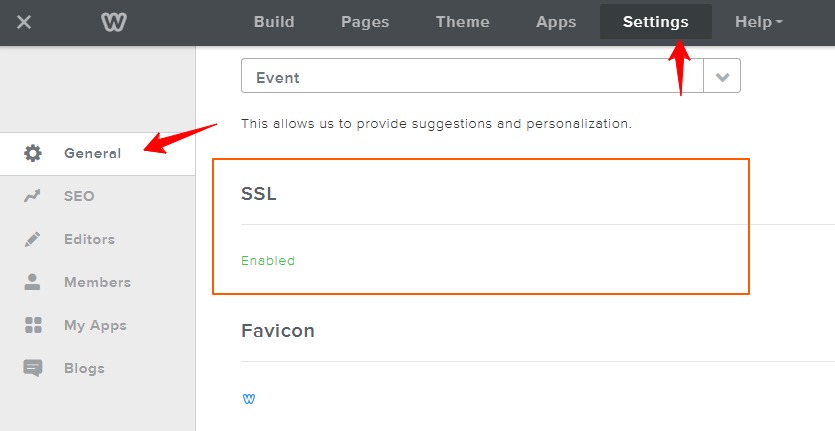
- Ensure SSL is enabled in Weebly.
- Replace any HTTP image, script, or file links with HTTPS versions.
4. Website Isn’t Showing on Google
One of the most common concerns among new website owners is:
“My website isn’t appearing in Google.”
Usually, this isn’t caused by a technical problem.
Instead, it may be because:
- Your website is new.
- Google hasn’t indexed it yet.
- The sitemap hasn’t been submitted.
- The page has little content.
- Search engines have been blocked accidentally.
Fix
- Connect Google Search Console.
- Submit your sitemap.
- Check that indexing is enabled in Weebly.
- Publish helpful, original content.
- Build internal links.
Remember that indexing can take several days or even weeks for new websites.
5. Can’t Log Into Weebly
Possible Causes
- Incorrect password
- Browser cookies
- Account security checks
- Temporary service outage
Fix
- Reset your password.
- Clear cookies.
- Try another browser.
- Disable VPN software temporarily.
- Confirm you’re using the correct email address.
6. Images Aren’t Loading
Symptoms
- Blank image placeholders
- Broken image icons
- Missing product photos
Causes
- Failed upload
- Deleted image
- Unsupported file format
- Cache issues
Fix
- Re-upload the image.
- Use JPG, PNG, or WebP formats.
- Clear browser cache.
- Check image URLs if using external hosting.
7. Website Loads Slowly
Website speed affects both SEO and user experience.
Common Causes
- Large images
- Too many apps
- Heavy custom code
- Autoplay videos
- Unoptimized page layouts
Fix
- Compress images before uploading.
- Remove unused apps.
- Reduce large background videos.
- Minimize custom scripts.
- Keep page layouts clean and simple.
8. Contact Form Isn’t Working
Symptoms
- Form submissions never arrive
- Email notifications missing
Causes
- Incorrect notification email
- Spam filtering
- Email provider blocking messages
Fix
- Verify the notification email address.
- Check spam folders.
- Submit a test inquiry.
- Consider using a dedicated form service if problems persist.
READ ALSO: How to create a “thank you” page (i.e. a submission confirmation page) For Weebly forms.
9. DNS Errors
DNS problems usually appear after changing domains or switching registrars.
Common Symptoms
- DNS_PROBE_FINISHED_NXDOMAIN
- Server not found
- Website unavailable
Fix
- Double-check DNS records.
- Confirm nameservers.
- Wait for propagation.
- Remove conflicting records.
Patience is often required, as DNS updates are not instantaneous.
10. 404 Page Not Found
Causes
- Deleted pages
- Changed URLs
- Broken links
- Missing redirects
Fix
- Restore deleted pages if appropriate.
- Update internal links.
- Create redirects for renamed pages.
- Check navigation menus.
Broken pages create a poor user experience and can negatively affect SEO if left unresolved.
Read Also: Create Custom 404 Weebly Page
11. Mobile Layout Problems
Symptoms
- Text overlaps
- Images overflow
- Buttons don’t work
- Menus display incorrectly
Fix
- Preview your site on mobile devices.
- Simplify layouts.
- Resize oversized images.
- Avoid fixed-width elements in custom code.
Always test your website on multiple screen sizes before publishing updates.
12. Online Store Checkout Issues
If you run a Weebly store, checkout issues can directly affect sales.
Check
- Payment gateway settings
- Shipping rules
- Tax configuration
- Product availability
- Currency settings
Run a complete test purchase after making changes.
13. Website Displays a “Coming Soon” Page
If visitors see a temporary landing page instead of your website:
- Confirm the website has been published.
- Check that the correct domain is connected.
- Verify DNS settings.
- Ensure you’re viewing the live site rather than a cached version.
14. Embedded Code Doesn’t Work
Custom HTML, JavaScript, and third-party widgets occasionally stop working.
Possible causes include:
- Invalid code
- Mixed content
- Third-party service outages
- Browser security restrictions
Test the embed independently and verify that the provider’s instructions have been followed.
15. Broken Internal Links
Broken links frustrate visitors and can reduce your site’s SEO performance.
Review your website regularly for links that point to:
- Deleted pages
- Old blog posts
- Incorrect URLs
- Renamed pages
Update them as needed and consider performing a periodic site audit.
General Troubleshooting Checklist
Before contacting support, try these steps:
1. Refresh the page.
2. Clear your browser cache.
3. Use a different browser.
4. Test on another device.
5. Disable browser extensions.
6. Check your internet connection.
7. Republish your website.
8. Review recent changes.
These simple actions resolve many common issues.
When Should You Contact Weebly Support?
Some problems require assistance from Weebly.
Examples include:
- Billing issues
- Account access problems
- Subscription questions
- Platform-wide outages
- Server-related errors
Before reaching out, gather:
- Screenshots
- Error messages
- URLs
- Browser details
- Steps to reproduce the issue
Providing this information can help resolve your problem more quickly.