Struggling to get your Weebly website to rank on Google? You’re not alone.
Many Weebly users assume that website builders limit their SEO potential. The truth is, Weebly provides all the essential tools you need to rank your pages… if you know how to use them correctly.
Whether you’re running a small business website, portfolio, blog, or online store, this step-by-step guide will show you exactly how to optimize your Weebly site for search engines in 2026.
By the end of this tutorial, you’ll know how to:
- Set up your website for SEO success
- Optimize every page on your Weebly site
- Improve site speed and user experience
- Rank higher in Google search results
- Avoid common Weebly SEO mistakes
- Monitor and improve your performance over time
Let’s get started.
Is Weebly Good for SEO in 2026?
Yes, Weebly is still capable of ranking well in Google.
Over the years, Weebly has added important SEO features, including:
- Custom page titles
- Meta descriptions
- Custom URLs
- Mobile-responsive themes
- SSL certificates
- 301 redirects
- Header tags
- Image alt text
- Sitemap generation
While platforms like WordPress offer more flexibility, most small businesses and creators can achieve excellent results with Weebly.
Remember: Google ranks content quality and user experience, not your website builder.
If your website is helpful, fast, easy to navigate, and optimized properly, you can compete successfully in search results.
How Search Engines Rank Weebly Websites
Google evaluates hundreds of ranking factors, but beginners should focus on these five:
- Relevance to the search query
- Content quality and usefulness
- User experience
- Website authority
- Technical SEO health
Think of SEO as answering three questions:
- Can Google find your pages?
- Can Google understand your pages?
- Does Google trust your pages?
Every tip in this guide improves one of those areas.
Step 1: Set Up Your Weebly Website for SEO Success
Before optimizing individual pages, ensure these basics are in place.
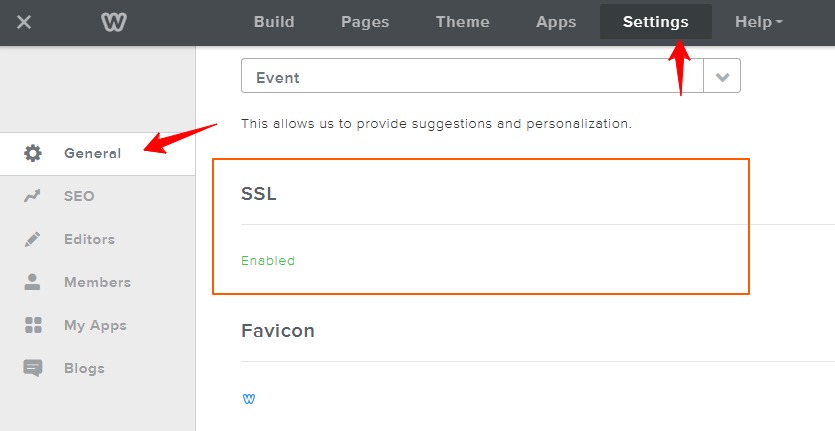
Enable SSL
Google prefers secure websites.
Most Weebly websites include free SSL certificates.
To verify:
Settings > General > SSL > Enable
Your website URL should begin with:
https://
Choose a Custom Domain
Avoid using a subdomain like:
mybusiness.weebly.com
Instead, use:
mybusiness.com
A custom domain looks more professional and builds trust.
Check Your Sitemap
Weebly automatically generates an XML sitemap.
Your sitemap is usually located at:
yourdomain.com/sitemap.xml (change “yourdomain.com” to your own website domain).
Submit it to Google Search Console later in this guide.
Make Sure Search Engines Can Index Your Site
In Weebly:
Settings > SEO
and Pages > SEO Settings
Ensure you haven’t accidentally blocked search engines.
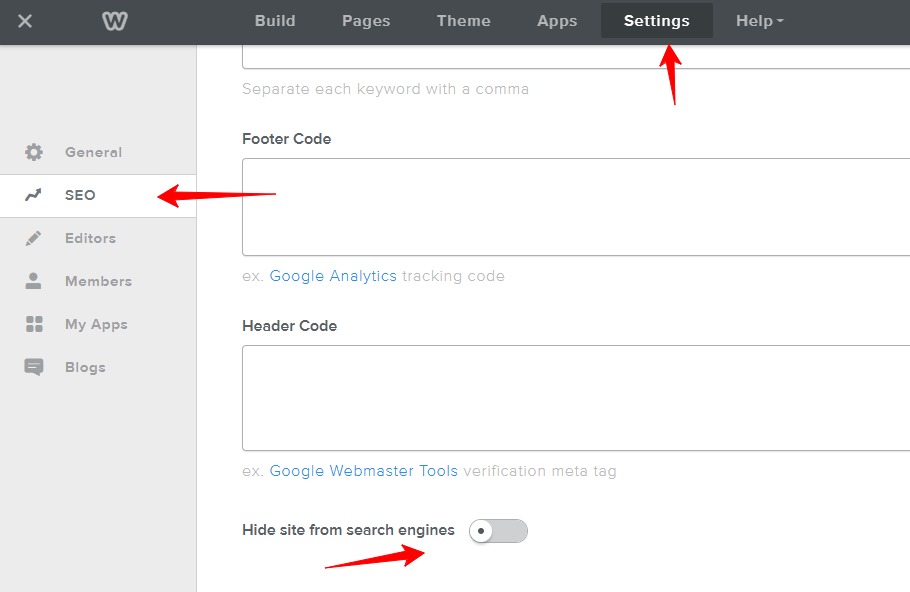

Make sure that “Hide site from search engines” is disabled as shown on the screenshot
Step 2: Perform Keyword Research
Keyword research helps you understand what your audience is searching for.
Instead of guessing, create content around real search demand.
Start With Customer Questions
Ask yourself:
- What problems do customers have?
- What solutions do they need?
- What questions do they ask repeatedly?
Use Keyword Research Tools
Helpful tools include:
- Google Autocomplete
- Google Keyword Planner
- Ahrefs
- Semrush
- Ubersuggest
- AnswerThePublic
Look for keywords with:
- Clear search intent
- Moderate competition
- Relevant business value
Focus on Long-Tail Keywords
Instead of targeting:
“gluten free”
Target:
“gluten free pizza delivery in SampleCity”
Long-tail keywords are easier to rank for and attract more qualified visitors.
Step 3: Optimize Every Weebly Page
Pages > Select a Page > SEO Settings
Each page should target one primary keyword.
Include it naturally in:
- Page title
- URL
- Main heading (H1)
- Introduction
- Subheadings
- Image alt text
- Meta description
Avoid keyword stuffing.
Write for people first.
Step 4: Create SEO-Friendly URLs
Short, descriptive URLs perform best.
Good Example
yourdomain.com/weebly-seo-guide
Bad Example
yourdomain.com/page-17
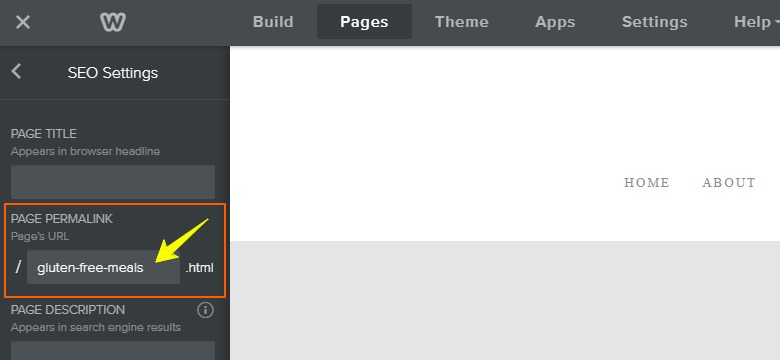
To edit a URL:
Pages > Select Page > SEO Settings > Page Permalink
Best practices:
- Use lowercase letters
- Separate words with hyphens
- Remove unnecessary words
- Include your target keyword
Step 5: Write Better Title Tags
Your title tag is often the first thing users see in search results.
Formula
Primary Keyword + Benefit + Year
Example:
Gluten-Free Meals Delivery In Sample City – My Website Title
Keep titles:
- Under 60 characters when possible
- Clear and compelling
- Unique for every page
Edit titles in:
Pages > Select a Page > SEO Settings
Step 6: Write Meta Descriptions That Increase Clicks
Meta descriptions don’t directly improve rankings, but they improve click-through rates.
Aim for:
- 140–160 characters
- Clear benefits
- Action-oriented language
- Target keyword inclusion
Example:
Discover delicious gluten free meals in SampleCity, from healthy breakfasts to satisfying dinners. Find fresh, flavourful options for every taste.
Step 7: Use Header Tags Correctly
Headers help search engines understand your content structure.
Use:
- H1 for the page title
- H2 for major sections
- H3 for subsections
Avoid:
- Multiple H1 tags
- Skipping heading levels
- Using headings purely for styling
Step 8: Optimize Images for SEO
Large, unoptimized images slow down your website.
Before uploading:
- Resize images appropriately
- Compress files
- Use descriptive filenames
Example:
gluten-free-brunch-pies.jpg
Instead of:
IMG_5149.jpg
Add descriptive alt text.
Example:
Gluten free brunch pies
Alt text helps:
- Search engines understand images
- Improve accessibility
- Increase image search visibility
Step 9: Improve Your Weebly Site Speed
Page speed affects rankings and user experience.
To improve performance:
- Compress images
- Remove unnecessary apps
- Limit animations
- Use fewer custom scripts
- Simplify page layouts
- Avoid autoplay videos
Test your website using:
- Google PageSpeed Insights
- GTmetrix
Aim for:
- Largest Contentful Paint (LCP) under 2.5 seconds
- Interaction to Next Paint (INP) under 200 milliseconds
- Cumulative Layout Shift (CLS) under 0.1
Step 10: Build an Internal Linking Strategy
Internal links help search engines discover pages.
They also keep visitors engaged.
Example:
If you publish a post about “new gluten-free pizza”, link to your article about “Now Offering Gluten-Free Meals”.
Best practices:
- Use descriptive anchor text
- Link related content naturally
- Include links to important pages
- Update older posts with new links
Step 11: Create Helpful Content That Ranks
Google rewards content that demonstrates:
- Experience
- Expertise
- Authoritativeness
- Trustworthiness
Focus on solving real problems.
Examples:
- Tutorials
- Checklists
- Troubleshooting guides
- Comparisons
- Case studies
Ask yourself:
Does this content answer the searcher’s question completely?
If not, improve it.
Step 12: Add Schema Markup to Weebly
Schema markup helps search engines understand your content.
It can increase your chances of earning rich results.
Useful schema types include:
- Organization
- Local Business
- Article
- FAQ
- Product
- Review
You can add schema code in:
Settings > SEO > Header Code
Always test your markup using Google’s Rich Results Test.
Step 13: Connect Google Search Console
Google Search Console shows:
- Which keywords drive traffic
- Indexing issues
- Sitemap status
- Page performance
Setup Steps
- Visit Google Search Console: https://search.google.com/search-console.
- Add your website property.
- Verify ownership.
- Submit your sitemap:
yourdomain.com/sitemap.xml (change “yourdomain.com” to your own website domain).
Review reports weekly.
Look for:
- Pages not indexed
- Mobile usability issues
- Search queries with high impressions but low clicks
Step 14: Set Up Google Analytics 4
Google Analytics helps you understand:
- Traffic sources
- User behavior
- Conversion rates
- Popular pages
To install GA4:
- Create a GA4 property.
- Copy your measurement ID.
- Add the tracking code in:
Settings > SEO > Footer Code
Monitor:
- Organic traffic growth
- Bounce rate
- Engagement time
- Conversion events
Step 15: Improve Local SEO
If you serve customers locally, optimize for local search.
Create a Google Business Profile
Include:
- Business name
- Address
- Phone number
- Business hours
Ensure your information matches your website exactly.
Add Location Keywords
Examples:
- Dublin wedding photographer
- Chicago dog groomer
- Sydney personal trainer
Collect Reviews
Positive reviews improve visibility and trust.
Ask satisfied customers to leave reviews regularly.
Step 16: Build High-Quality Backlinks
Backlinks remain one of Google’s strongest ranking signals.
Earn links by:
- Publishing original content
- Creating useful resources
- Writing guest posts
- Sharing case studies
- Building local partnerships
Avoid:
- Buying backlinks
- Link schemes
- Spam directories
Focus on quality over quantity.
Common Weebly SEO Mistakes to Avoid
Many beginners make these mistakes:
- Using duplicate page titles
- Ignoring meta descriptions
- Publishing thin content
- Forgetting image alt text
- Using vague URLs
- Neglecting mobile optimization
- Not connecting Search Console
- Targeting overly competitive keywords
- Publishing without internal links
- Ignoring search intent
Avoiding these mistakes can significantly improve your rankings.
Your Weebly SEO Checklist for 2026
Use this checklist before publishing any page.
Technical SEO
- SSL enabled
- Sitemap submitted
- Mobile-friendly design
- Fast loading pages
- Search indexing enabled
On-Page SEO
- One primary keyword
- Optimized title tag
- Compelling meta description
- Proper heading structure
- Optimized images
- Internal links added
Content Quality
- Matches search intent
- Comprehensive and helpful
- Updated information
- Easy to read
Authority
- Backlinks earned
- Author information included
- Trust signals displayed
Frequently Asked Questions
Does Weebly have built-in SEO tools?
Yes. Weebly includes essential SEO features such as custom titles, meta descriptions, SSL, redirects, and sitemap generation.
Can Weebly websites rank on Google?
Absolutely. Well-optimized Weebly websites can rank competitively in many industries.
Does Weebly automatically create a sitemap?
Yes. Most Weebly websites automatically generate a sitemap at:
yourdomain.com/sitemap.xml
Is Weebly better than WordPress for SEO?
WordPress offers more customization options, but Weebly is easier for beginners. For most small businesses, Weebly provides all the SEO tools needed to succeed.
Compare Weebly SEO vs WordPress.
How long does Weebly SEO take to work?
SEO is a long-term strategy.
Most websites see meaningful improvements within three to six months of consistent optimization.
Final Thoughts
Improving your Weebly SEO doesn’t require technical expertise.
Start with the basics:
- Choose the right keywords
- Optimize every page
- Improve your site speed
- Create helpful content
- Monitor your results
SEO success comes from consistent effort over time.
Implement the strategies in this guide, and you’ll build a stronger foundation for long-term organic traffic growth.
The best time to optimize your Weebly website was yesterday. The second-best time is today.
Need Help?
Need assistance with your Weebly website’s SEO? We are the experts. Click here to request a quote.